
These questions come up constantly: How do you present a business plan presentation? Which AI actually produces slides you can use? Not a summary. Not an outline in a chat window. Actual editable slides, with a structure that makes sense, ready to open in PowerPoint or Google Slides. The answer depends heavily on which tool you use and what you mean by “generate.” Teams that need a polished business presentation for a real audience often end up at this website after discovering that most AI tools get you partway there, but not all the way.
That gap is worth understanding before you commit time to a tool that will not deliver what you actually need.
What Does It Mean for AI to Generate PowerPoint Slides?
There is a real difference between generating a presentation and generating content about a presentation. Most general AI chatbots do the second thing. They produce outlines, suggest slide titles, and write bullet points. Useful, but not a deck. A true slide generator produces an actual file — structured, formatted, and editable — that you can open and work with immediately.
What separates tools in this category:
- Whether the output is a downloadable file or just text
- Whether formatting and layout are applied automatically
- Whether the structure follows business presentation slide design best practices
- Whether the slides can be edited without rebuilding everything from scratch
That last point matters more than it sounds. A deck generated as an image or a locked format is almost useless for real business use. Editable output is the baseline requirement.
Can ChatGPT Generate PowerPoint Slides?
ChatGPT can write slide content — titles, bullet points, speaker notes — and structure it logically by section. In some configurations, it can produce a Python script using the python-pptx library that technically creates a PowerPoint file. But that requires running code, and the output is basic: minimal formatting, no design, no visual hierarchy.
For a corporate presentation going to a real audience, the raw output from ChatGPT needs significant work before it is usable. It is a content-drafting tool, not a slide-generation tool in practice. If you are looking for business presentation templates with actual design applied, ChatGPT alone will not get you there.
What it is good for: drafting the narrative, writing section copy, and generating multiple structural options to compare before committing to one.
Can Gemini, Claude, Perplexity, or Grok Generate Slides?
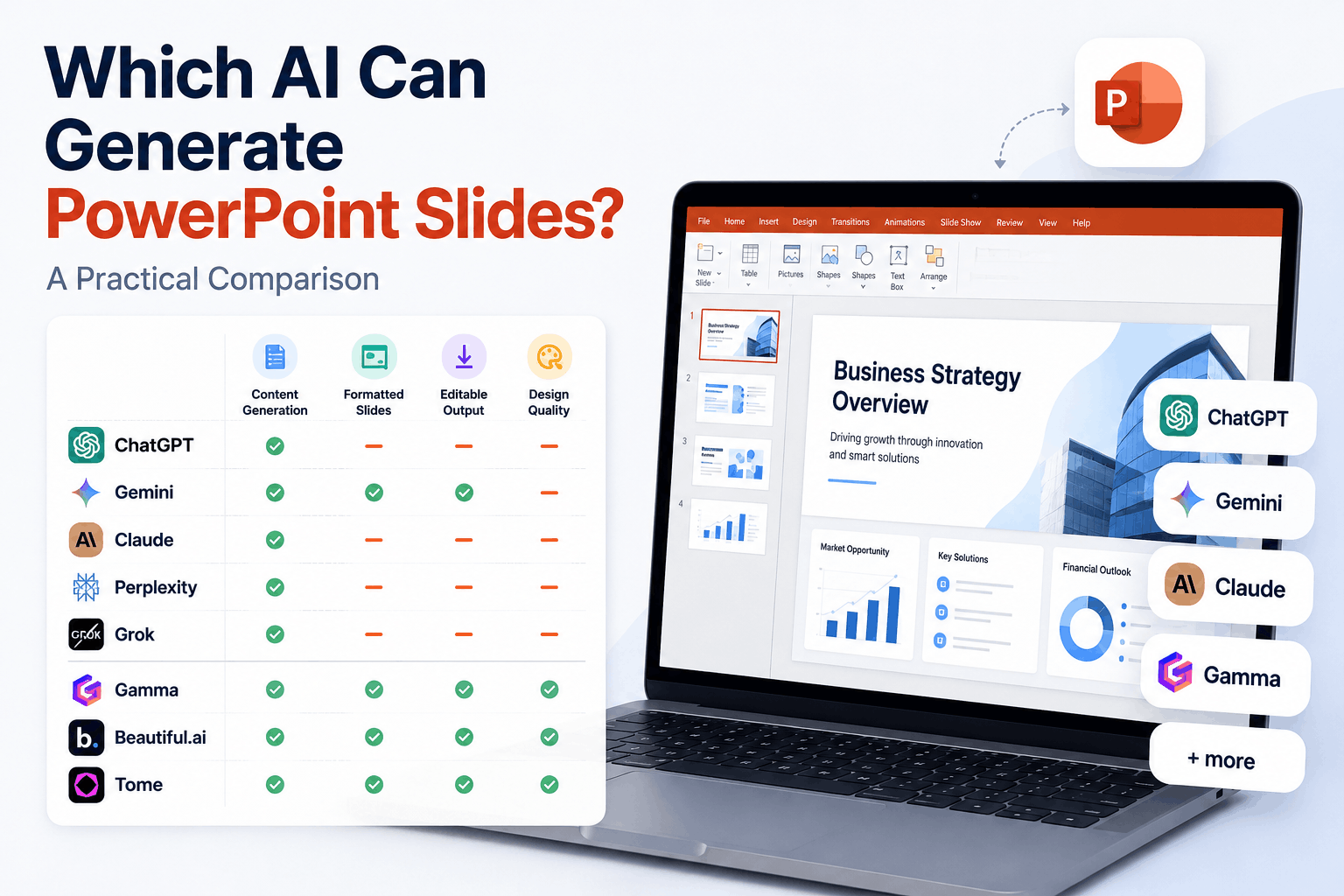
Broadly, the same limits apply. These are language models. Their output is text. Some have integrations that extend their capabilities — Gemini connects to Google Workspace and can push content directly into Google Slides, which is genuinely useful for teams already in that ecosystem. The formatting is still minimal, but at least the output lands in an editable format without extra steps.
Claude and Perplexity produce quality written content and can clearly structure a professional slide deck outline. Grok follows a similar pattern. None of them generate a formatted, designed PowerPoint file natively. They are reasoning and writing tools being asked to do a design job, and that mismatch shows in the output.
For teams that need a structured business presentation template with actual visual design, these tools are better used upstream: to clarify thinking, draft content, and organize the argument before a dedicated tool or a designer handles the slides themselves.
Dedicated AI Presentation Generators vs General AI Chatbots
This is where the distinction gets practically important. Tools built specifically for slide generation — Gamma, Beautiful.ai, Tome, and others — actually produce formatted decks. They apply layouts, choose visual hierarchies, and output files you can edit. The trade-off is that the design is template-driven, and the content generation is less sophisticated than that of a state-of-the-art language model.
| Factor | General AI Chatbots | Dedicated Slide Generators |
| Output format | Text / outline | Formatted, editable slides |
| Design quality | None (raw output) | Template-based, consistent |
| Content quality | High | Moderate |
| Business presentation structure | Strong narrative logic | Depends on the template |
| Editing flexibility | Requires manual build | Edit within the tool |
| Best use | Drafting content and structure | Getting to a designed draft quickly |
The practical workflow most teams land on: use a general AI to develop the content and structure, then feed that into a dedicated slide generator to produce the formatted output. It is an extra step, but it produces better results than either tool alone.
For business presentations where the design itself needs to signal professionalism — investor decks, client proposals, board presentations — neither category fully replaces human design judgment. How you present a business plan presentation to an investor is not just a content question. It is a design and communication question, and that requires a different level of craft.
Which AI Is Best for Editable PowerPoint Slides?
For raw content and structure, ChatGPT, Claude, and Gemini are all strong. Gemini has a practical edge for Google Slides users through its direct integration. For formatted, editable output that does not require a manual build step, dedicated generators like Gamma and Beautiful.ai deliver more immediately useful results.
The honest answer is that no single AI tool produces a complete, polished business presentation without human input. The tools that come closest are dedicated generators. However, they still require good source material, editorial judgment on the output, and, often, a design pass before the deck is ready for a real audience.
Business slides templates generated by AI are a starting point. The finishing is still a human job, and for presentations where it actually matters, it’s worth doing properly.
No Responses